
Ensuring your PC satisfies the correct system requirements is vital when entering the immersive universe of Satisfactory, a factory-building game that challenges players to automate and maximize output on an alien planet. Whether you’re building expansive conveyor belts or running sophisticated machinery, your hardware determines how the game performs. This guide clarifies minimum and recommended specs, optimization advice, and responses to often asked questions by dissecting the Satisfactory system requirements.
Satisfactory Minimum System Requirements
Your PC must satisfy the minimum requirements to run Satisfactory at a basic level. These settings let the game run, even if you might see lower frame rates or less visual fidelity, especially in bigger factories:
Minimum Requirements
- Operating System: Windows 7/8.1/10 (64-bit)
- Processor: Intel Core i5-3570 or AMD equivalent
- Memory: 8 GB RAM
- Graphics: NVIDIA GeForce GTX 770 2GB or AMD Radeon HD 7970 3GB
- DirectX: Version 11
- Storage: 15 GB available space
Satisfactory loads and runs are available in minimum settings, but players may experience lag in late-game stages as factories grow. Lower graphical settings and resolutions—e.g., 720p—are advised for better performance.
Satisfactory Recommended System Requirements
Aim for the suggested Satisfactory system requirements for an optimal experience—higher frame rates, better visuals, and seamless gameplay even in large factories:
Recommended Requirements
- Operating System: Windows 10/11 (64-bit)
- Processor: Intel Core i7-7700 or AMD Ryzen 5 2600
- Memory: 16 GB RAM
- Graphics: NVIDIA GeForce GTX 1060 6GB or AMD Radeon RX 580 8GB
- DirectX: Version 12
- Storage: 15 GB available space (SSD recommended)
Meeting these specs guarantees stable performance during demanding automation tasks, better multitasking, and sharper textures. Large save files benefit from an SSD’s further reduction of load times.
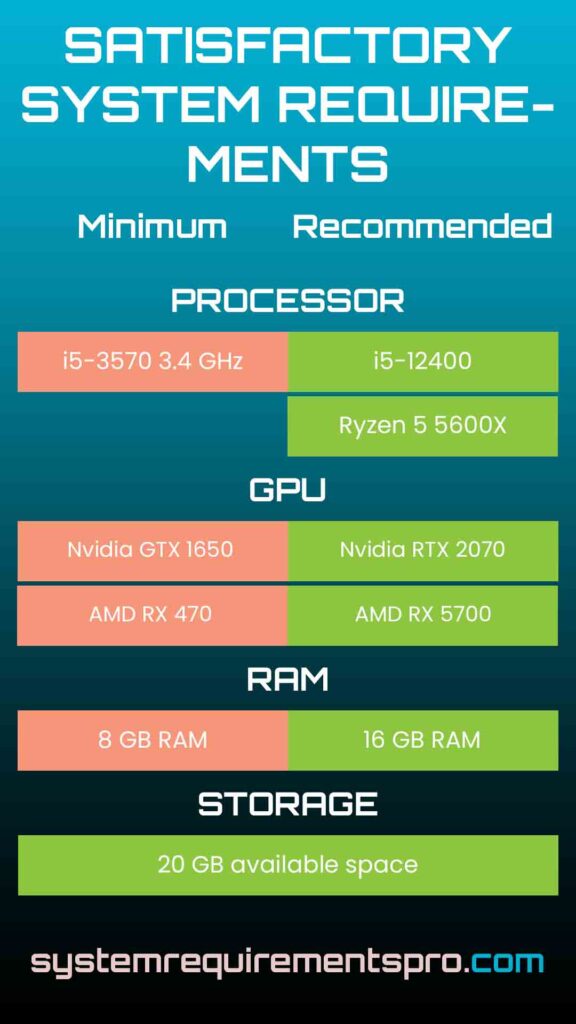
Satisfactory System Requirements PC: Minimum vs Recommended Requirements
Knowing the variations between minimum and recommended specs enables you to customize your system to fit your objectives. While advised specs offer a premium experience, minimum requirements are the baseline for running the game.
| Component | Minimum Requirements | Recommended Requirements |
|---|---|---|
| OS Requirements | Windows 7/8.1/10 (64-bit) | Windows 10/11 (64-bit) |
| Processor Requirements | Intel Core i5-3570 | Intel Core i7-7700 / AMD Ryzen 5 2600 |
| Memory Requirements | 8 GB RAM | 16 GB RAM |
| Graphics Requirements | NVIDIA GTX 770 / AMD HD 7970 | NVIDIA GTX 1060 / AMD RX 580 |
| Storage Requirements | 15 GB HDD | 15 GB SSD |
Performance Comparison:
- Visuals: Minimum specs will use low textures and shadows, recommended specs will use higher detail.
- Frame Rate: 30-45 FPS on minimum hardware, 60+ FPS on recommended.
- Late Game Stability: Complex factories will strain CPUs; an i7-7700 or better will prevent slowdowns.
Optimization Tips for the Satisfactory Game
Even if your PC meets the Satisfactory system requirements, these will help:
- In-Game Settings
- Lower shadows, post processing, and anti-aliasing.
- Disable motion blur and vsync for higher FPS.
- Update Drivers
Make sure your GPU drivers are up to date for compatibility and performance. - Close Background Apps
Free up RAM by closing browsers or streaming apps. - SSD
Load times will be significantly reduced if you install the game on an SSD. - Monitor Hardware Temperatures
Overheating can throttle performance, so keep your hardware cool. - Mods and Community Fixes
Check out performance-enhancing mods (e.g., reduced particle effects) from trusted sources.
Conclusion
Balancing the Satisfactory system requirements with your hardware capabilities ensures a seamless and enjoyable factory-building experience. Although minimum specs let you start the game, recommended hardware unlocks its best performance, especially in late-game situations. Combining the correct configuration with clever tweaks lets you concentrate more on creativity than on technical flaws.
Frequently Asked Questions
Can I run Satisfactory on a laptop with integrated graphics?
Integrated GPUs will struggle, even with min specs. Dedicated graphics (e.g., GTX 770) are highly recommended.
How do min and recommended specs affect gameplay?
Min specs will get you by, recommended specs will get you smooth in complex factories.
Should I upgrade my RAM or GPU first?
Prioritize RAM (16GB) if you’re multitasking, or a GPU (e.g., GTX 1060) for better visuals.
Can I run Satisfactory below the minimum specs?
Performance will be severely impacted, leading to crashes or unplayable framerates.
Does Satisfactory support cross-platform play?
Yes, but system specs are the same across platforms.
We hope that you have found the answer to the system requirements for Satisfactory. Follow System Requirements Pro for more such updates, and bookmark this page to get the latest updates on the system requirements for Satisfactory.